A local multiplayer handheld lets two or more people play together in the same room, with no internet needed. How well it works depends on the connection method, not just the hardware. Some handhelds share one screen. Some link two devices over a direct wireless connection. Some use emulator features that need a bit of setup. This guide explains each method, which retro systems suit it, where setups usually fail, and what to ask before you pay for a device.
TL;DR
- Local multiplayer means players in the same space, either sharing one device or linking separate devices directly. Online play goes over the internet.
- Real handheld link play (PSP ad-hoc, DS wireless, link cables) works as designed. Emulator Netplay works too, but you set it up yourself.
- Lighter 8-bit and 16-bit systems are the safest bet for two handhelds. Heavier systems like N64 and PS1 generally struggle with Netplay on standard retro handhelds.
- Most failed sessions come down to mismatched cores, game files, regions or Wi-Fi trouble, all fixable before you start.
- The Retro Pulse is built around solo, offline-first play. Check its product page for multiplayer details before you buy for that purpose.
Table of Contents
- What local multiplayer actually means
- The connection methods you will run into
- Which systems cope best
- Setting up two handhelds without internet
- Why it fails, and how to fix it
- Perspective: pick the play you will actually do
- Buying checklist for a multiplayer handheld
- Where the Retro Pulse fits
- FAQ
- Sources
What local multiplayer actually means
The term covers two different setups, and shoppers often mix them up.
Same-screen play. Everyone shares one device. This is the classic couch arrangement, often called split-screen or same-screen gaming, as one overview of multiplayer architecture describes it. On a handheld with a 3.5-inch screen, this is only comfortable for turn-based games, or for two players taking turns.
Linked devices. Each player has their own handheld, and the devices connect directly across a short distance. Local wireless play needs no internet connection or Wi-Fi router, because the consoles talk to each other. That is the opposite of online multiplayer, which goes through the internet whether your friend is in the next room or across the world.
Why bother with local at all? LAN-style play removes lag and anonymity, two of the most common complaints about online games. Game designers have also long argued that being in the same room allows interaction that online play can’t offer. You can see your friend’s face when you win. For parents, that is the whole point: a shared device and a shared sofa.
The connection methods you will run into
Retro handhelds reach local multiplayer in one of three ways.
Original link features
Many older systems had a built-in way to connect. The Emulation General Wiki lists PSP ad-hoc, DS local wireless, Xbox System Link, the GameCube Broadband Adapter and link cable support on many systems. If you own original hardware, this is the most dependable route, because the games were designed for it.
The PSP is a good example. It supports local wireless ad-hoc play between nearby devices, and that is why so many PSP titles still make good party games. If you own two PSPs and two copies of a game (or a game that supports one-disc sharing), you can still play today.
Emulator Netplay
Most modern retro handhelds run RetroArch or similar software. RetroArch’s Netplay emulates single-system local multiplayer over a network by synchronizing multiple instances of the same emulator core and game content. In plain terms: two handhelds run the same game in step with each other, and each player sees the same thing, like two controllers plugged into one console.
The network does not have to be the internet. Two devices on the same home Wi-Fi, or on a phone hotspot, can host and join sessions without any online service. That makes it a true local option, even though the word “Netplay” sounds online.
Single-device sharing
The simplest approach needs no network at all. Plug a second controller into a handheld with a TV output, or pass the device back and forth for turn-based games. It is less glamorous, but it never fails because of Wi-Fi.
Which systems cope best
Not every retro system is equal for linked play. Netplay has to keep two devices in sync frame by frame, and that is demanding on small processors. Hobbyist testing of handheld Netplay reports that resource-heavy systems like N64, Dreamcast and PS1 generally don’t support Netplay on standard retro handhelds, which leaves most multiplayer to 8-bit and 16-bit systems. Treat that as a practical rule of thumb rather than a guarantee, since results vary by device and emulator core.
That is less limiting than it sounds. The 8-bit and 16-bit eras are where much of the best couch play lives:
| Era | Typical systems | Good fit for |
|---|---|---|
| 8-bit | NES, Master System | Simple two-player brawlers, sports, racing |
| 16-bit | SNES, Genesis | Fighters, beat ’em ups, run-and-gun co-op, puzzle versus modes |
| Handheld classics | Game Boy, GBA | Link-style versus and trading, usually two players |
| Arcade | Arcade cabinets | Co-op brawlers and shooters designed for sharing a screen |
| 3D era | N64, PS1 | Same-screen play on one device, rather than linked Netplay |
Player counts depend on the game and the system, so check the specific title. Many 8-bit and 16-bit games top out at two players. A few allow four, and some arcade games go further. If you want four or more people playing together, look at the game’s own listing first, then at how the device handles controllers.
Game types that suit a small screen
On a 3.5-inch display, some genres hold up better than others:
- Versus fighters and sports. Two players, short rounds, easy to hand over the device or link two.
- Co-op brawlers. Side-scrolling fighters are fun with a friend and work on small screens because the action stays in a narrow band.
- Puzzle versus. Each player has their own board, so a shared screen is rarely a problem.
- Racing and split-screen shooters. These get cramped fast on a small display. They are better with each player on their own device.
For arcade-style picks, our guide to arcade emulation on handhelds covers what to expect.
Setting up two handhelds without internet
The exact menus vary by device, but the sequence is the same almost everywhere.
- Put both devices on the same network. This can be your home router, or a hotspot from a phone. If you are somewhere without Wi-Fi, check whether your handhelds can create their own access point.
- Match the software. Both devices need the same emulator core, and the core version should match too. Both need the same game file. A different dump of the same game can break the session.
- Start the host. One player enables a Netplay session. Hobbyist guides describe the usual routine: the host starts a session and the other device either scans the local network or enters an IP address manually.
- Join from the second device. Use the Netplay menu to find the host, or type the host’s IP address if scanning does not find it.
- Test with a short game first. Check that both controllers respond before you commit to a long session.
Some ports even support local co-op through direct IP entry. One community guide notes that Stardew Valley via PortMaster supports local LAN co-op on devices including the R36S, with players joining by entering the host’s IP address.
If your handheld arrives with games already loaded, you skip the part where you hunt for files. Our emulation handheld setup guide explains the basics in plain English, and how to add games to a handheld covers what to do when you want titles beyond the preloaded library.
Why it fails, and how to fix it
When a session will not start, one of a few things is usually responsible.
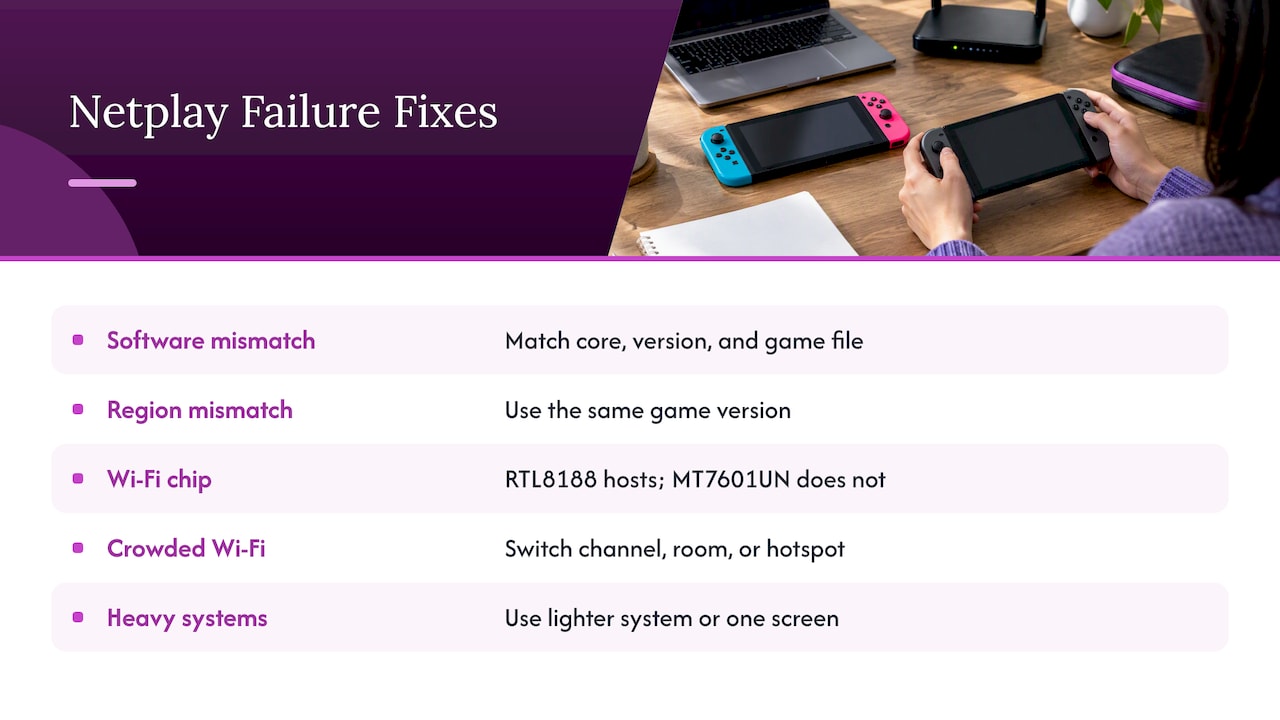
Mismatched software. This is the most common culprit. Netplay generally expects the same core, the same core version and the same game file on each device. Update both handhelds to the same state before you try again.
Region mismatches. One roundup of multiplayer troubles points to mismatched game regions (NTSC versus PAL), incompatible firmware and Wi-Fi interference where many networks are active. If one player has a Japanese version and the other a U.S. version, use the same version on both.
Wi-Fi hardware. Not all handheld Wi-Fi chips can host. One hobbyist write-up on the R36S notes that the Realtek RTL8188 chip supports AP mode while the MediaTek MT7601UN does not. If you are buying a budget handheld for two-device play, find out which chip it uses and whether it can host a connection. Many boxes do not say.
Crowded airwaves. Apartment buildings and conference halls have dozens of networks. If the connection keeps dropping, move to a different channel, a different room or a phone hotspot.
Too heavy a system. If N64 or PS1 games stutter in Netplay, switch to a lighter system or play on one screen.
If you want to know more about the PSP angle: modding tools like PPSSPP have also turned ad-hoc play into online play for some players, according to one 2026 roundup. That is useful when your friend lives elsewhere, but it needs the internet and takes you out of the local category.
Perspective: pick the play you will actually do
We sell the Retro Pulse, so here is where we stand. Most people who ask about local multiplayer picture a living room with a friend. The reality is that handheld multiplayer is the part of retro gaming with the most moving pieces: matching cores, matching files, Wi-Fi chips, regions. A lot of buyers want none of that. They want to press power and play.
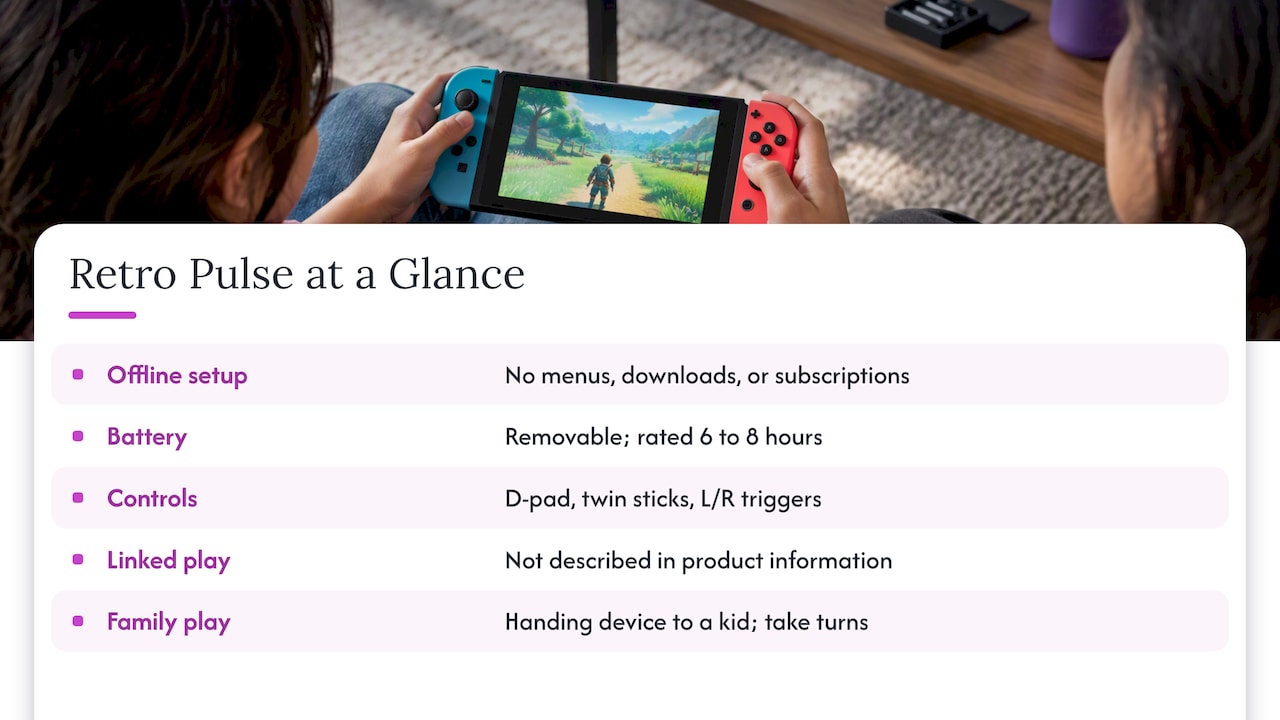
That is how we built our offering. The Retro Pulse is offline-first, curated, and ready to play without menu setup, downloads or subscriptions. It has a real D-pad, twin sticks and L/R triggers, a 3.5-inch IPS display, a removable battery rated at 6 to 8 hours, and dual microSD slots for adding games. It ships from a U.S. warehouse with a one-year warranty and 30-day returns.
We will be straight about what we are not claiming here. Our product information does not describe a linked two-device mode, so if linked play with a friend on a second handheld is your main goal, ask us or read the product page before you order. What the Retro Pulse is very good at is giving a parent, a commuter or a gift recipient a huge library with no setup. For many families, the best multiplayer is simply handing the device to a kid and taking turns, which is why we wrote about sharing retro games with kids.
— Sean
Buying checklist for a multiplayer handheld
Before you pay for anything marketed as a local multiplayer handheld, run through these questions.
- How does it connect? Ask whether it uses a link cable, direct wireless, Netplay over Wi-Fi or only a TV output with extra controllers.
- Can the Wi-Fi chip host? Without that, two devices may need a router or hotspot every time.
- Which systems are supported for linked play? Expect lighter systems to be better supported than N64 or PS1.
- Are the controls comfortable for long sessions? Real sticks and triggers matter more in versus games than a spec sheet suggests. Our look at dual analog handhelds for N64 and PSP goes into that.
- How long does the battery last? Two players burn through a charge at the same speed as one, so a swappable battery is a real advantage on trips.
- What is the return policy? Multiplayer compatibility is hard to judge from a product page. A return window gives you room to test.
If you are weighing a handheld against a plug-in mini console for family nights, our comparison of mini consoles and handhelds lays out when each makes sense. If a phone is already your main device, phone emulation versus a dedicated handheld covers the trade-offs.
Where the Retro Pulse fits
If your priority is a portable library for solo play, commutes, car rides and sharing with kids, the Retro Pulse handheld is what we make. It comes preloaded with 15,000 classic games from more than 20 systems, including NES, SNES, Genesis, PS1, N64, Game Boy, GBA and arcade. You can add your own through the dual microSD slots, and it charges over USB-C. Gift buyers can see more in our retro gaming gift ideas.
Curious whether your family is better off with a handheld or a console? Our Switch versus retro handheld comparison puts per-game costs next to a single library.
FAQ
Can two R36S handhelds play together?
Often yes, but the Wi-Fi chip is the deciding factor. Hobbyist testing shows that the Realtek RTL8188 chip can run in AP mode and the MediaTek MT7601UN cannot. If your units use the weaker chip, connect both to a router or a phone hotspot instead.
Can the PSP play local multiplayer?
Yes. The PSP supports local wireless ad-hoc play between nearby devices, with no internet required. Each player typically needs their own PSP, and some games let one copy serve both.
What is the difference between local and online multiplayer?
Local multiplayer happens in the same space, either on one device or through a direct connection between devices. Online multiplayer goes through the internet, even when players sit in the same room. Local is usually more reliable and avoids lag.
Does RetroArch Netplay need the internet?
No. Netplay synchronizes the same emulator core and game on each device, and it can run over a home network or hotspot. Both devices need matching cores and the same game file.
Which retro games work best for two players?
Versus fighters, sports, puzzle games and side-scrolling co-op brawlers from the NES, SNES, Genesis and arcade eras are the easiest fit for a small screen. Check each title’s player count before you plan a session.
Sources
- Multiplayer video game (Wikipedia)
- I Love The Switch’s Local Wireless Multiplayer (How-To Geek)
- The Evolution and Architecture of Multiplayer Gaming Systems
- Designing local multiplayer games for microconsoles (Game Developer)
- Netplay (Emulation General Wiki)
- The Most Impressive Multiplayer PSP Games Ever Made (Retro Dodo)
- FAQ (Libretro Docs)
- Guide: RetroArch NetPlay on Handheld Devices (Retro Game Corps)
- Stardew Valley v1.6 via PortMaster (Retro Handheld Guides)
- R36S NetPlay (AlfaExploit)
- 11 Best Multiplayer PSP Games To Play With Friends (Technical Ustad)