Buy a curated, preloaded handheld if you want to play classic games in the next five minutes without touching a settings menu. Retro Pulse is the direct recommendation for most buyers hunting for a retro handheld comparison, since it skips ROM setup entirely. Only choose a higher-power handheld PC if you specifically need PS2 or GameCube-level emulation and don’t mind spending evenings on controller mapping and firmware tweaks.
TL;DR:
- Retro Pulse ships preloaded with 15,000 games from over 20 systems, eliminating ROM hunting and setup time for casual players.
- Its 3.5-inch IPS screen and real D-pad with triggers make it suitable for precise control and portability, ideal for quick sessions.
- The device features a removable battery, USB-C charging, and dual microSD slots, allowing for longer playtime and expandable libraries.
- It supports offline operation without subscriptions or account setup, which simplifies the user experience for families and gift buyers.
- A one-year warranty and U.S. shipping ensure reliable support and faster delivery, making it a low-risk option for instant retro gaming.
Table of Contents
- What To Look For In A Retro Handheld Comparison
- How Screen Size And Aspect Ratio Change Gameplay
- What Performance And Ease Of Use Actually Look Like
- Price Tiers And Where Your Money Actually Goes
- How To Choose Your Retro Handheld In Four Steps
- How Retro Pulse Matches The Buying Checklist
- Audio Quality And Headphone Support
- Included Accessories And Expandability Options
- An Honest Take On Buying A Retro Handheld
- Order Retro Pulse: What’s Included And How To Buy
- Sources
- FAQ
What To Look For In A Retro Handheld Comparison
Every retro handheld boils down to six things: controls, screen, performance, battery, storage, and how much setup you’re willing to tolerate. Get these six right and the brand name barely matters.
Start with controls. A mushy D-pad ruins fighting games and platformers faster than any other flaw, so press it in the store or check review footage for a click, distinct microswitch feel rather than a soft rubber dome. Thumbsticks matter less for pure retro libraries (NES, SNES, Game Boy) but become essential once you’re emulating N64 or PS1 titles with analog control schemes.
Screen quality is next. Look for an IPS panel, not a cheap TN display, because IPS holds color and contrast at wide viewing angles, which matters when you’re handing the device to a kid in the back seat.
Performance expectations should scale with what you actually play. A 16-bit library (NES, SNES, Genesis, Game Boy) runs comfortably on modest hardware. Anything reaching into PS1 or N64 territory demands more processing headroom, and PS2 or GameCube emulation pushes into a different device class entirely.
Battery life and storage round out the checklist:
- Removable batteries let you carry a charged spare instead of hunting for an outlet, a real advantage on long drives or flights, according to The Verge’s testing of handheld gaming PCs.
- USB-C charging is now the baseline expectation. Anything using a proprietary cable is a red flag on longevity.
- Dual microSD slots (one for the system, one for expansion) give you room to grow without reflashing the whole device.
- Curated, preloaded libraries eliminate the ROM-hunting and file-matching that trips up first-time buyers, a point GamesRadar’s retro console guide makes repeatedly when comparing plug-and-play devices to DIY emulation boxes.
Pro Tip: Before buying, look up whether the device ships with save states enabled by default. Save states let you pause mid-level on a boss fight, which matters more than raw horsepower for casual weeknight sessions.
How Screen Size And Aspect Ratio Change Gameplay
Aspect ratio decides how a 30-year-old game actually looks on modern glass, and it’s the single most overlooked spec in any vintage handheld comparison. Original Game Boy and Game Boy Color titles were built for a nearly square display. Stretch them onto a widescreen panel and you either get thick black bars on the sides (pillarboxing) or distorted, smeared pixels from forced scaling. A 4:3 or square-leaning screen preserves the original artist’s intent for that era of games, a distinction Retrosizer’s device comparison tool illustrates well when you toggle between console generations side by side.
Widescreen panels earn their keep once you move into PS1, N64, or Dreamcast territory, where games were designed with wider fields of view or benefit from letterboxing that doesn’t waste screen real estate.
Physical size changes the experience just as much as the ratio:
- A 3.5" screen disappears into a jacket pocket and feels natural for short sessions on a commute.
- A 4.3" screen is the sweet spot for most buyers: big enough to see detail, small enough to stay one-handed.
- 6" and larger screens turn into two-handed devices better suited for couch play than a backpack.
If your primary library is Game Boy or Game Boy Color, prioritize a squarer display. If you’re chasing PS1 or N64 classics, widescreen wins.
What Performance And Ease Of Use Actually Look Like
Emulation power scales in tiers, and knowing which tier you need saves you from paying for horsepower you’ll never use. Simple 8-bit and 16-bit systems (NES, SNES, Genesis, Game Boy) run smoothly on entry-level chips. PS1 and N64 need noticeably more processing power. PS2 and GameCube sit at the top of the difficulty curve and typically require a full handheld PC rather than a compact retro device.
That power comes with strings attached. Android and Windows-based handheld PCs deliver the most raw capability, but they also demand real configuration work, from installing emulator front ends to mapping controller buttons to tracking down BIOS files, according to PCMag’s review of the Retroid Pocket 3. Linux-based and purpose-built devices trade some of that ceiling for a smoother out-of-box experience, a gap PCMag’s testing of the Anbernic RG351P documents directly when comparing setup friction across device families.
There’s also a separate lane worth knowing about: FPGA-based reproduction hardware, like Analogue’s lineup, which recreates original console circuitry instead of emulating it in software. That approach delivers near-zero input latency and hardware-accurate output, which collectors value, but it trades away the broad multi-system libraries that emulation and curated devices offer, a distinction The Verge’s Analogue Pocket review lays out clearly.
Before buying anything, run this quick performance checklist:
- Confirm which console generations the device officially supports rather than assuming “it can probably run PS1.”
- Check whether firmware updates are handled automatically or require manual downloads.
- Look for reviews mentioning input lag on fast-paced titles, not just frame rate benchmarks.
- Ask whether the library is preloaded or requires you to source and organize files yourself.
Pro Tip: Load a latency-sensitive game, a fighting game or tight platformer, and play it for five to ten minutes before buying. Frame-rate charts don’t reveal how a D-pad actually feels under pressure.
Price Tiers And Where Your Money Actually Goes
Retro handhelds generally split into three tiers, and each one solves a different problem. Budget devices (under $50) usually run only the earliest 8-bit systems and often ship with mediocre D-pads and dim, non-IPS screens. Mid-range devices ($50 to $150) are where curated preloaded consoles and capable multi-system emulators live, offering IPS displays, better ergonomics, and libraries spanning a dozen or more systems. Premium handheld PCs ($200 and up) buy you PS2 and GameCube capability, but that power comes with shorter battery life and real setup time, a trade-off The Verge’s Ayaneo 2 review covers in detail.
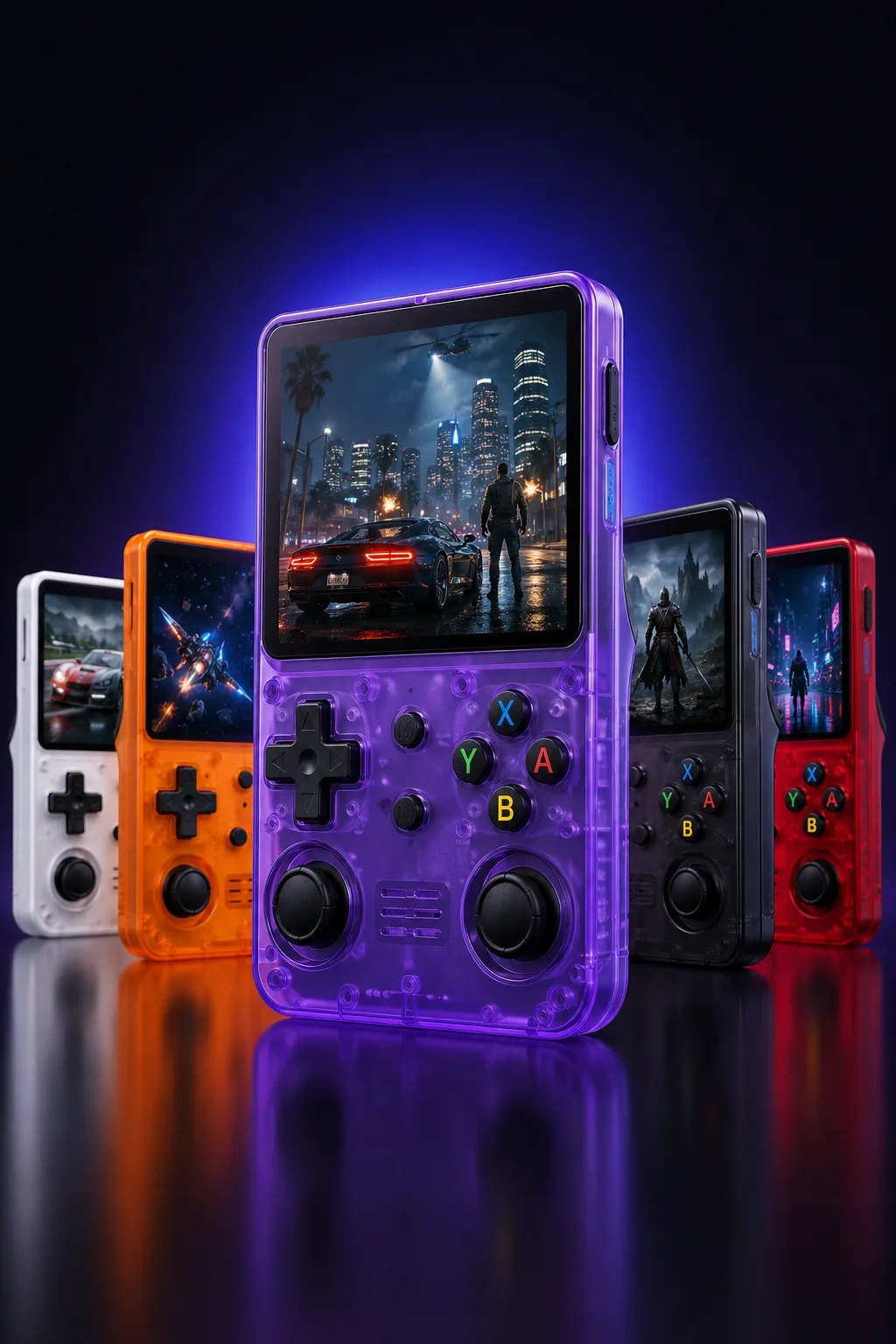
The biggest quality jump happens in the mid-range tier, where an IPS screen and a proper microswitch D-pad replace the flimsy components common at the bottom of the market. Spending more past that point buys raw processing power, not day-to-day comfort, unless PS2-level emulation is genuinely on your list.
A few practical value factors matter more than the sticker price:
- A one-year warranty signals a manufacturer stands behind the hardware past the return window.
- Shipping from a U.S. warehouse avoids the long delays and inconsistent quality control common with overseas drop-shipped devices.
- Multi-unit bundles can lower the per-device cost meaningfully for gift buyers or households with more than one kid.
- Buying guides that segment picks by price tier and use case, like Retro Dodo’s best retro handhelds roundup, are a useful sanity check against inflated marketing claims.
How To Choose Your Retro Handheld In Four Steps
Picking the right device gets simple once you commit to a process instead of comparing spec sheets forever.
- Define your primary use case first. Are you buying a gift for a kid, a nostalgia device for yourself, or a serious emulation rig for late-era 3D games? This answer eliminates most options immediately.
- Shortlist two or three devices by price tier and actual availability, not by review score alone. A five-star device that ships from overseas in six weeks isn’t a five-star buying experience.
- Test ergonomics and screen quality in person or through detailed video review before ordering. Hold-time matters as much as horsepower.
- Confirm warranty terms, return policy, and shipping origin before checkout. A one-year warranty and U.S.-warehouse shipping remove most of the risk from an online purchase.
Most readers land on step one and realize they want plug-and-play convenience, not a configuration project.
How Retro Pulse Matches The Buying Checklist
This device ships preloaded with a large library of games spanning multiple systems, so there’s no ROM sourcing or file matching before you can play.
Here’s how the specs line up against what actually matters when you’re comparing retro handhelds:
- 3.5" IPS display — compact enough for a pocket, bright enough to hold color at an angle, matching the mid-range sweet spot most casual buyers land on.
- Real D-pad, twin sticks, and L/R triggers — physical controls built for the fighting games and platformers where mushy inputs ruin the experience.
- Removable 6 to 8 hour battery with USB-C charging — swap a spare on long trips instead of hunting for an outlet.
- Dual microSD slots — room to expand the library without reflashing the device.
- Offline-first operation — no subscriptions, no menus, no account setup standing between power-on and gameplay.
The device targets a specific buyer profile: parents who want to share childhood games with their kids, commuters who want instant pickup-and-play sessions, and gift buyers who don’t want to explain emulator setup on Christmas morning. One-year warranty coverage and U.S. warehouse shipping back that up with a support structure, not just a spec sheet.
Audio Quality And Headphone Support
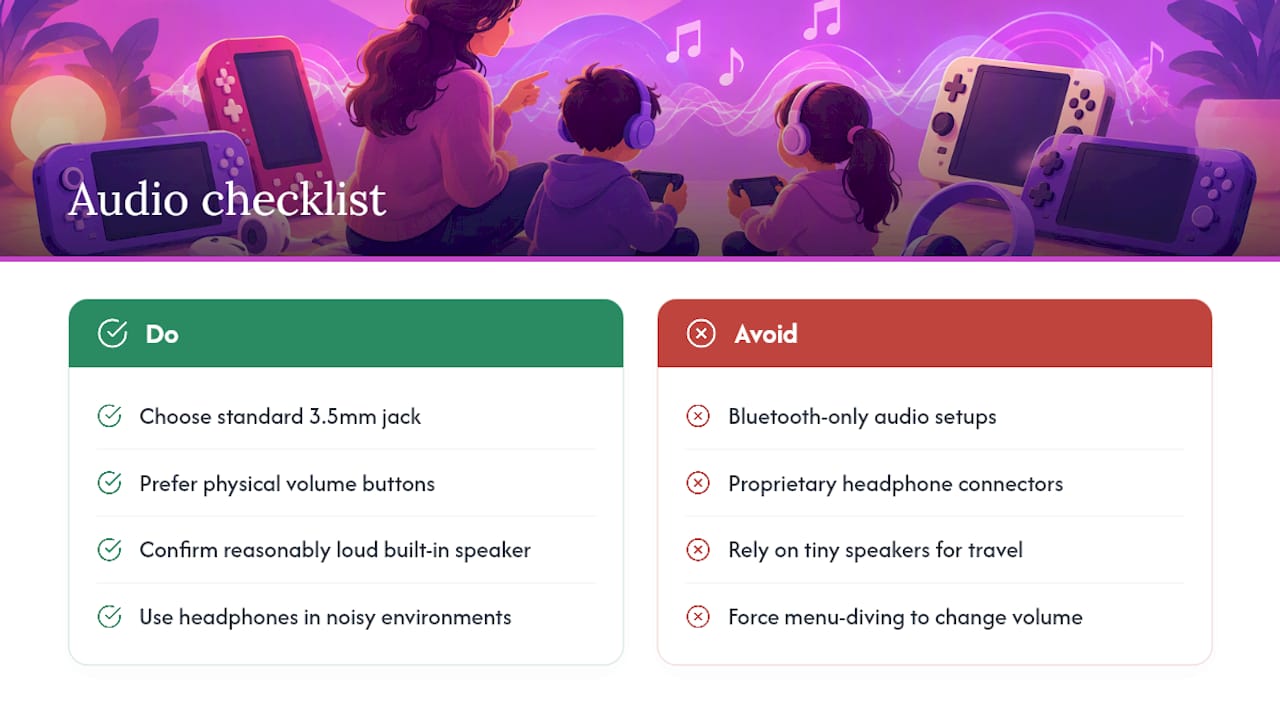
Sound gets overlooked in most retro handheld reviews, but it shapes the experience just as much as the screen. Original 8-bit and 16-bit soundtracks were composed on limited sound chips, and a tinny built-in speaker can flatten that music into noise. A dedicated 3.5mm headphone jack matters more here than on modern gaming devices, since so much of the retro catalog leans on chiptune scores that reward decent headphones or external speakers.
Built-in speakers are fine for casual, one-off sessions in a quiet room, but they rarely deliver enough volume or clarity for anything beyond background noise. If you plan to play on transit, in a shared house, or anywhere with ambient noise, headphone support isn’t optional. Look for a standard 3.5mm jack rather than a proprietary connector or Bluetooth-only setup, since Bluetooth audio introduces latency that becomes noticeable in rhythm games and tight platformers.
Volume controls also deserve a quick check before buying. Physical buttons for volume beat menu-diving through an on-screen display, especially for kids who need to adjust sound quickly without pausing gameplay. A handheld with a dedicated headphone jack, physical volume buttons, and a reasonably loud built-in speaker covers nearly every listening scenario a retro gamer runs into, from a quiet bedroom session to a noisy car ride.
Included Accessories And Expandability Options
What comes in the box affects your total cost more than most buyers realize. A charging cable is standard across nearly every device, but the difference between USB-C and a proprietary cable determines whether you can replace it easily years down the road. USB-C wins here simply because it’s everywhere, from phone chargers to laptop docks.
Storage expansion is the other major factor. Dual microSD slots let you keep the original preloaded library intact on one card while adding your own files to a second, without ever touching the base system. Single-slot devices force a trickier choice between wiping factory content or juggling file transfers every time you want to add something new.
A removable battery counts as an expandability feature in its own right. Devices that let you swap in a charged spare extend a single gaming session indefinitely, something fixed-battery devices simply can’t match once the charge runs out. Protective cases, extra styluses for touchscreen models, and screen protectors round out the common accessory list, though not every device includes them standard. Before buying, check specifically whether the box includes a case or protective sleeve, since that’s an added cost on devices that ship bare.
An Honest Take On Buying A Retro Handheld
Most retro handheld shopping guides oversell horsepower and undersell friction. The truth is simpler: most people who buy one of these devices want to relive a childhood memory or hand one to a kid, not build a personal emulation lab. For that buyer, a curated, preloaded device like Retro Pulse is the right call, full stop.
The exception is real, though. If PS2 or GameCube nostalgia is the actual target, a handheld PC with real configuration time ahead of it is the honest answer, not a compromise.
— Sean
Order Retro Pulse: What’s Included And How To Buy
Retro Pulse is the alternative to hunting through overseas marketplaces for a retro handheld comparison, since it ships from a U.S. warehouse instead of leaving you waiting weeks and guessing at quality control. Every unit arrives preloaded with 15,000 games across more than 20 systems, a 3.5" IPS display, real D-pad and twin-stick controls with L/R triggers, a removable battery rated for 6 to 8 hours, USB-C charging, and dual microSD slots for expansion.
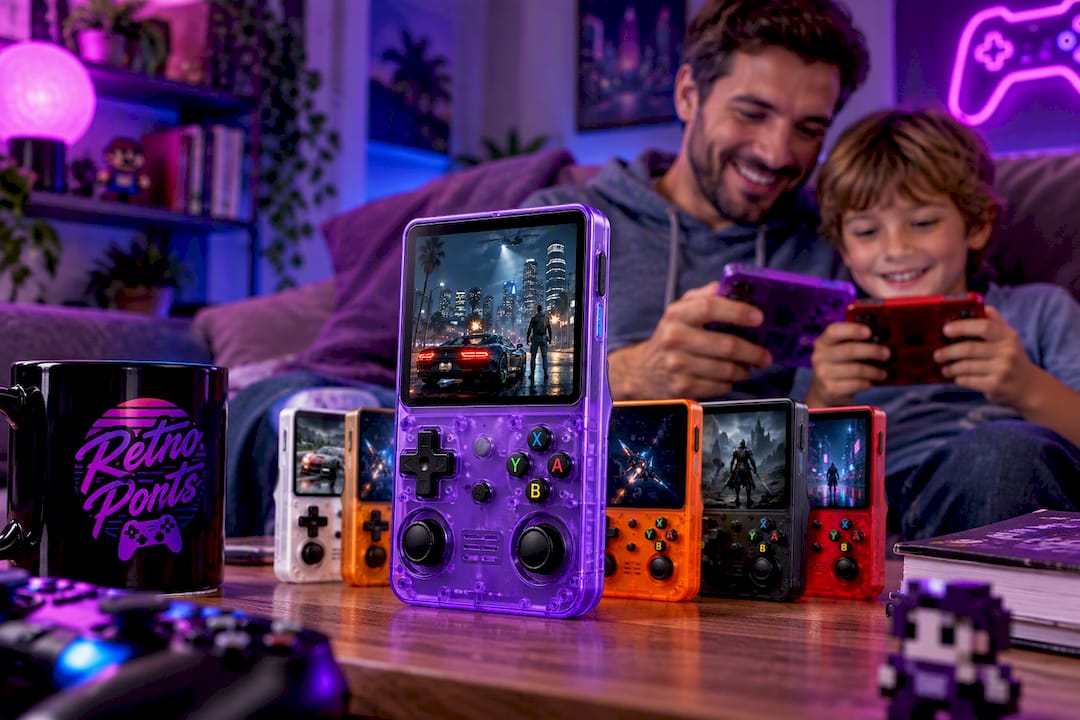
Every order includes a one-year warranty and a 30-day return window, so there’s no risk in trying it before deciding it’s a keeper. It’s built for gift buyers, parents introducing kids to classic games, commuters who want instant pickup-and-play, and anyone tired of ROM hunting and emulator configuration. If that sounds like your situation, check current pricing and place your order on the Retro Pulse product page, or browse the full lineup at Retroports to see bundle options for multiple units.
Sources
FAQ
Can You Compare Different Retro Handheld Consoles Fairly?
Yes, once you group them by job rather than brand: curated preloaded devices for plug-and-play convenience, handheld PCs for late-era 3D emulation, and FPGA reproduction hardware for collectors chasing hardware accuracy. Comparing specs alone misses which buyer each device actually serves.
What Is The Best Retro Emulation Handheld For Beginners?
For most beginners, a curated, preloaded handheld like Retro Pulse beats a configurable emulation PC, since it skips ROM sourcing and controller mapping entirely. Buyers who specifically need PS2 or GameCube support should expect more setup time on a higher-power device instead.
Are Retro Handhelds Worth It?
Retro handhelds are worth it for anyone who wants instant access to classic games without hunting down original hardware or cartridges. Curated, preloaded handhelds are especially valued by families and gift buyers for their plug-and-play access, according to GamesRadar’s retro console coverage.
Which Retro Handheld Should I Buy?
Choose a curated preloaded device if you want to play within minutes of unboxing, and choose a handheld PC only if PS2 or GameCube emulation is a firm requirement. Retro Pulse fits the first group directly, with a preloaded 15,000-game library and no setup required.
How Much Does Retro Pulse Cost?
Current pricing for Retro Pulse is listed directly on the product page, including any active multi-unit bundle offers. Every purchase includes a one-year warranty and a 30-day return window.