Play together, pick simple cooperative retro games, and start with a device that works the moment you turn it on. Short five to ten minute sessions with easy controls build the strongest early connection, and a ready-to-play handheld removes the setup friction that kills momentum before the fun starts.
TL;DR:
- For ages 2 to 5, choose forgiving games without reading, timers, or harsh failure; ages 6 to 8 can handle cooperative platformers.
- Let children choose paths and make mistakes; ask what they might try before offering help, since taking the controller can undermine their sense of control.
- For children ages 2 to 5, the AAP recommends about one hour of high quality screen time daily, with shared use preferred over solo viewing.
- A dedicated offline handheld avoids emulator setup and many modern console subscriptions, but its fixed curated library offers less flexibility than an open catalog.
Table of Contents
- Why retro games make such good family bonding tools
- Age-appropriate game choices and what to look for
- Co-play strategies that keep kids in the driver’s seat
- Setting up controllers, screens, and time limits without the hassle
- A ready-to-play option that skips the setup entirely
- Keeping play child-led so learning goes both ways
- Helping kids who’ve never seen a D-pad get comfortable fast
- Adjusting difficulty so every age gets a fair challenge
- Making retro history part of the fun
- Keeping gaming sessions healthy with built-in breaks
- Building bonding moments beyond the controller
- Dedicated handhelds versus emulators and modern consoles
- Start small and play tonight
- Bring retro gaming home with Retro Pulse
- FAQ
- Sources
Why retro games make such good family bonding tools
Shared screen time gets a bad reputation, but the research on parent-child co-play tells a different story. A co-play study out of Clemson found that playing digital games together can strengthen relationships, support reciprocal learning, and ease social anxiety rather than isolate family members, which contradicts the older assumption that games pull families apart.
Retro titles fit this model naturally. They’re short, simple, and forgiving, which means a parent and a seven-year-old can sit down for a few minutes without either person needing a tutorial. The Clemson research also notes that a short first session, around five to ten minutes with one clear cooperative goal, tends to produce real conversation and makes kids more willing to come back for another round later.
The American Academy of Pediatrics backs this framing too. Its Media and Young Minds policy recommends coviewing for younger children and treats shared use as the healthier default compared to solo screen time, especially for kids under six.
A few things make that first session go smoothly:
- Pick a game with one or two buttons so nobody is lost in a menu.
- Set a short timer so the session ends on a high note, not a meltdown.
- Sit side by side rather than handing over the controller and walking away.
- Let your child make the first mistake and laugh about it together.
Over the long run, shared play works best when the parent doesn’t run the show. One finding worth building your whole approach around: autonomy-supportive co-play, where the child makes meaningful choices and the parent scaffolds rather than directs, preserves a child’s sense of control during shared play, according to HCI research on co-play design. That idea shapes everything in the next section.
Age-appropriate game choices and what to look for
Not every retro title works for every age, and matching the game to the kid matters more than matching the kid to a system.
Ages 2 to 5. Look for bright, forgiving games with no fail states and no reading required. Simple puzzle games or basic platformers where falling just resets the screen work well. Avoid anything with a timer or a scoring pressure that could frustrate a toddler who’s still learning cause and effect.
Ages 6 to 8. This is the sweet spot for two-player cooperative platformers. Kids this age can handle a D-pad and two action buttons, follow a simple goal like “get to the flag,” and tolerate occasional failure if a parent is playing alongside them. Arcade-style puzzle games also shine here because rounds are short and restarting costs nothing.
Ages 9 and up. Kids in this range can take on turn-based RPGs with light strategy, longer arcade challenges, or even light competitive games against a parent. They’re ready for games with inventories, simple leveling systems, or multi-stage levels.
A few checklist items before handing a game to a child:
- Try it yourself first for two or three minutes to confirm the controls are simple enough.
- Check that the difficulty ramps slowly instead of spiking in the first level.
- Confirm there’s no in-game timer pressure that could cause frustration for younger kids.
- Make sure a “game over” screen is gentle, not punishing, so a loss doesn’t end the session on a bad note.
This matches AAP guidance on testing media before handing it to a child rather than assuming any given title is appropriate. The AAP’s media policy specifically recommends parents preview content for young children and favor shared use over solo play for toddlers.
Cooperative platformers, simple arcade puzzlers, and light turn-based RPGs cover almost every age bracket without requiring a deep retro catalog. The goal isn’t variety. It’s picking two or three games that fit your child’s current skill level and sticking with them until they’re ready for something harder.
Co-play strategies that keep kids in the driver’s seat
The easiest way to ruin a shared gaming session is to take over the controller every time your child struggles. Research on autonomy-supportive co-play found that asymmetric roles, where the parent scaffolds and the child makes the actual decisions, reduce parental dominance and keep the child’s sense of agency intact during shared play, according to HCI findings from Interaction Design and Children 2026.
In practice, that means structuring sessions so your child is always the one deciding what happens next, even when you’re the one with more experience playing the game.
A simple session routine to try:
- Set a short goal together before picking up the controllers, like “let’s reach the second level.”
- Play in five to ten minute rounds so nobody loses interest or gets frustrated.
- Alternate who leads: one round your child decides the path, the next round you ask them to teach you something they figured out.
- Ask a reflection question at the end, like “what was the tricky part?” instead of just moving on.
- End before the fun runs out, even if that means stopping mid-level.
A few prompts that work better than taking the controller:
- “What do you think happens if we try that?”
- “Show me how you got past that part.”
- “What would you do differently next time?”
These questions hand the decision-making back to your child and turn a skill gap into a teaching moment instead of a correction. The same co-play research found that structured caregiver roles, where the parent asks rather than directs, improved the shared experience for both people, not just the child.
Pro Tip: If your child gets stuck, count to five before offering help. Most kids find their own solution if you give them a beat before stepping in.
This approach also sidesteps a common trap: parents who grew up with the original games sometimes can’t resist showing off a shortcut or a trick. Save that for when your child asks. The teaching moments land better when they’re invited rather than imposed, and they tend to produce the kind of back-and-forth conversation that makes a ten-minute session feel like real quality time rather than screen time with extra steps.
Setting up controllers, screens, and time limits without the hassle
The fastest way to kill a family game night is a twenty-minute setup process before anyone touches a controller. Offline, plug-and-play devices sidestep that entirely, since there’s no account creation, no firmware update, and no app store nagging for a purchase mid-session.
That offline approach also solves a behavioral problem parents don’t always anticipate. A policy review on digital ecosystems and children flagged frequent in-game rewards and easy advancement systems as possible drivers of compulsive play in many modern app-based games. A curated, offline library of older games skips those reinforcement loops almost entirely, since there’s no purchase prompt and no notification pulling a kid back in between sessions.
For devices that do connect online, the ESRB’s parental control tools let you block games by rating, set daily time limits, restrict online chat, and lock down in-game purchases across most major platforms. Setting these up takes a few minutes and is worth doing even if you plan to mostly play offline together.
On time limits specifically, the AAP’s media guidance recommends about one hour of high-quality screen time daily for children ages 2 to 5, with an emphasis on shared rather than solo use. For older kids, the Family Media Plan offers a flexible framework parents can adapt instead of a single fixed number, covering things like screen-free zones and balance between media and other activities.
A first-session checklist that covers most of this in under five minutes:
- Charge the device the night before so you’re not waiting around.
- Pick one easy game ahead of time instead of browsing together, which burns the time you have.
- Agree on a time limit out loud before starting, not after the timer goes off.
- Plan a two-minute reflection chat for after the session ends.
One hour of shared, high-quality screen time is the general benchmark the AAP recommends for children ages 2 to 5, which makes a short retro session an easy fit rather than something you have to negotiate down from a longer modern game session.
A ready-to-play option that skips the setup entirely
Everything above works better with a device that doesn’t fight you on setup. That’s the gap we built the Retro Pulse handheld to close. It ships preloaded with 15,000 games across more than 20 systems, including NES, SNES, Genesis, PS1, N64, Game Boy, and GBA, so there’s no downloading, no account, and no subscription standing between your kid and the first round.
The design choices map directly onto the setup and safety habits above:
- A display and real D-pad with twin sticks and L/R triggers make controls approachable for kids who’ve never held a retro-style controller.
- Offline-first operation means no ads, no store prompts, and no in-app purchase lures interrupting a session.
- A removable battery rated for several hours of play covers a long road trip or several short sessions without a charging interruption.
- Dual microSD slots let you add more games later without replacing the device.
- A robust build and warranty hold up to sibling hand-offs and the occasional drop.
- Units ship with a return window, which matters if a grandparent orders one as a gift and needs time to decide.
Offline, curated libraries reduce exposure to the ads, purchase prompts, and reward loops that can push a child toward excessive play.
Digital Ecosystems, Children, and Adolescents Policy (AAP, 2025)
Because the library is curated rather than an open app store, there’s no browsing rabbit hole eating into your ten-minute session. Hand it to one kid for an afternoon, then hand it to a sibling an hour later, with no account switching or progress loss to manage. For families juggling multiple kids and limited patience for tech troubleshooting, that simplicity tends to matter more than raw game count.
Keeping play child-led so learning goes both ways
Autonomy and reciprocal learning sound like a classroom concept, but in practice they’re simple: let your child be the expert sometimes. Kids who grew up with touchscreens often pick up retro controls differently than adults who learned them the first time around, and that gap is useful rather than a problem.
Try swapping who’s “in charge” of a session. One round, you follow your child’s lead and let them pick the path through a level. The next round, ask them to walk you through a trick they discovered. This two-way structure is exactly what autonomy-supportive co-play research points to as the difference between a session that builds connection and one where a parent quietly takes over.
Watch for a few habits that tip toward dominance without you noticing: narrating every move, grabbing the controller “just to show” something, or steering every decision toward the outcome you’d pick. None of these are wrong in small doses, but repeated often enough, they turn a shared activity into a lesson your child didn’t ask for.
A better rhythm: ask before you act, narrate your own thinking instead of your child’s, and treat a wrong turn in-game as part of the fun rather than something to correct immediately. The goal isn’t a perfect run through the level. It’s a conversation that happens because of the game, not despite it.
Helping kids who’ve never seen a D-pad get comfortable fast
Kids raised on touchscreens often find a D-pad and physical buttons unfamiliar at first, and that’s normal rather than a sign they won’t enjoy retro games.
Start with a game that has forgiving controls and immediate feedback, like a simple platformer where a jump clearly does something fun. Let your child mash buttons for the first minute or two without correcting them. Most kids figure out the basic mapping faster through trial and error than through verbal instruction.
A few things help the transition:
- Narrate your own first moves out loud so they can see the logic, not just hear it.
- Pick games where losing doesn’t cost much, so experimentation feels safe.
- Avoid games with diagonal inputs or multi-button combos for a first session.
- Celebrate small wins, like successfully jumping over one obstacle, rather than waiting for level completion.
If a game feels too stiff after a few minutes of genuine effort, switch to something simpler rather than pushing through. The goal of an introductory session is comfort with the controller, not mastery of a specific title. Once a child is comfortable with basic movement and one action button, almost every other retro game becomes easier to pick up.
Adjusting difficulty so every age gets a fair challenge
Retro games weren’t designed with modern difficulty sliders in mind, so adjusting challenge for different ages often means choosing the right game rather than tweaking a setting.
For younger kids, look for games with no fail state or a very generous one, where mistakes simply reset a short section instead of ending the game. For ages six to eight, games with checkpoints every minute or two work well, since frustration builds fast if a child has to redo five minutes of progress after one mistake. For nine and up, full retro difficulty, including the classic trial-and-error style many older games use, is often fine and can even become part of the appeal.
A few practical adjustments beyond picking the right title:
- Play alongside a younger child and quietly take the harder parts of a level if they ask for help.
- Use two-player cooperative modes where available, which let a parent cover the trickier sections without taking the controller away.
- Skip games that require memorizing exact button sequences until a child has had a few sessions to build confidence with basic controls.
Difficulty that feels fair keeps kids coming back. Difficulty that feels punishing ends the session early, so when in doubt, choose the more forgiving title over the more impressive one.
Making retro history part of the fun
Kids are naturally curious about “why does this look different,” and that curiosity is an easy opening for context that makes the games more interesting rather than more complicated.
A simple way in: tell your child what you were doing when you first played a specific game, like how old you were or where the console sat in your house. Kids connect to stories about their parents far more than to facts about release dates.
A few other angles that tend to land well:
- Point out how few buttons older games used and ask your child to guess why.
- Compare a retro game’s graphics to a modern one your child already knows, without framing either as better.
- Explain that a game you’re playing together is older than you are, if that’s true, since kids often find this genuinely surprising.
- Let your child ask questions rather than delivering a history lecture upfront.
Keep it brief. A single comment or story between rounds does more than a planned explanation, and it keeps the history feeling like a bonus to the game rather than homework attached to it.
Keeping gaming sessions healthy with built-in breaks
Short sessions solve most of the physical and behavioral concerns that come up around screen time, but a few habits make retro gaming sessions healthier by default.
Keep individual sessions to the five to ten minute rounds mentioned earlier, and build in a stretch or a walk between rounds if you’re playing for longer than twenty minutes total. This also lines up with the AAP’s recommendation of roughly one hour of high-quality screen time daily for children ages 2 to 5, since a few short rounds fit comfortably inside that window without crowding out other activities.
A few other habits worth building in:
- Play at arm’s length distance from the screen, especially on smaller handheld displays.
- Take a break if a child starts rubbing their eyes or complaining about a headache, rather than pushing to finish a level.
- End sessions with the reflection chat mentioned earlier instead of immediately switching to another screen.
- Avoid gaming right before bedtime, since the back-and-forth excitement of co-play can make winding down harder.
None of this requires special equipment or a strict schedule. The short, cooperative format that makes retro games good for bonding also happens to make them easy to keep healthy, since there’s rarely a reason to play for an hour straight when a ten-minute round already delivers the payoff.
Building bonding moments beyond the controller
The game itself is only part of what makes a shared gaming session memorable. A few small additions turn a quick round into something your child actually asks to repeat.
Keep a simple log together, even just a sticky note on the fridge, of games you’ve tried and a one-word reaction from your child. Looking back at it later becomes its own kind of conversation. Let your child pick the next game from a short list instead of choosing for them, which reinforces the autonomy habits covered earlier.
A few other ideas:
- Turn a reflection chat into a tiny ritual, like always asking “best moment, worst moment” after a session.
- Let an older sibling teach a younger one a game you’ve already introduced, which extends the bonding beyond just parent and child.
- Pair a gaming session with a snack or a specific day of the week, so it becomes something to anticipate rather than a random occurrence.
- Share a quick story about your own childhood connection to a game before playing it for the first time together.
None of this requires extra time. A ten-minute session with a thirty-second story and a quick reflection afterward still fits inside a short window, and it’s usually the story and the conversation, not the game itself, that a child remembers a year later.
Dedicated handhelds versus emulators and modern consoles
Parents researching retro gaming for kids usually land on three paths: a dedicated handheld, emulator software on a phone or computer, or a modern console with backward-compatible titles. Each has real trade-offs worth knowing before you choose one.
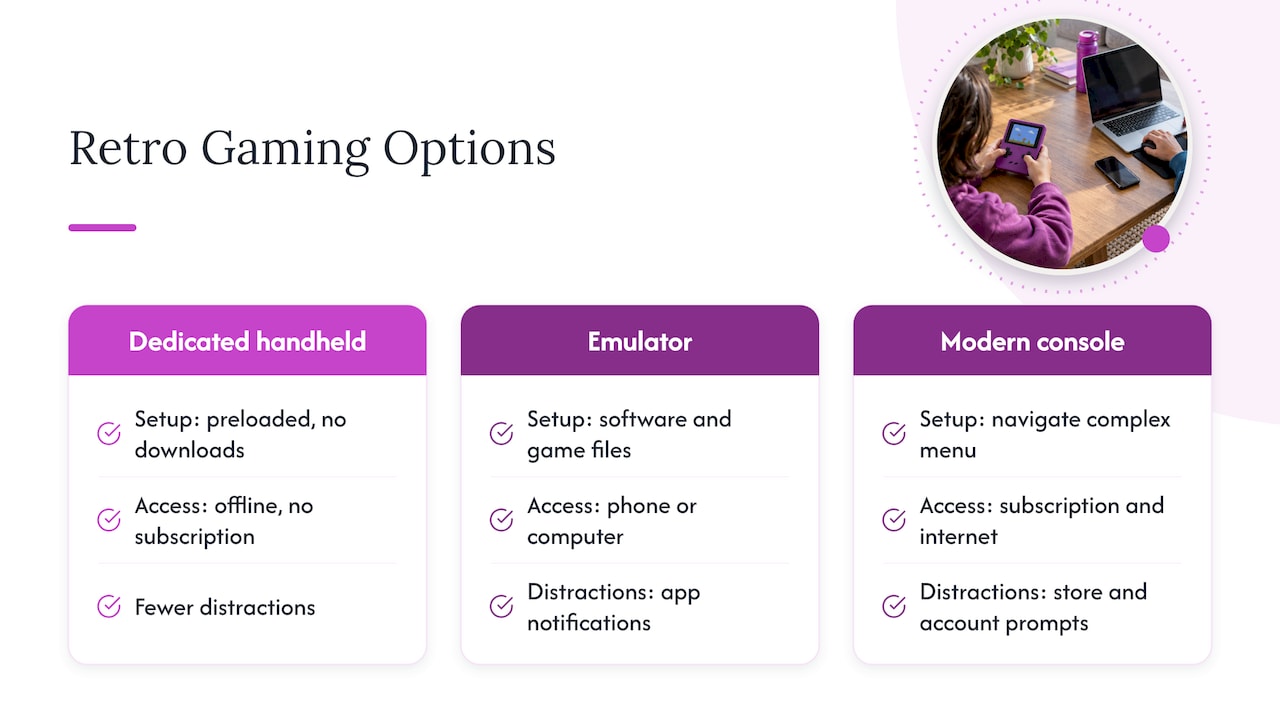
Emulators require downloading software and separately sourcing game files, a process that involves more technical steps and more screens between your child and actual play. It also typically means a phone or tablet, which brings app notifications and other distractions into what’s supposed to be a focused activity.
Modern consoles with retro libraries often require a subscription and an internet connection, plus navigating a menu built for a much larger and more complex game catalog than a young child needs. That’s more friction for a parent trying to start a quick session, and more screen real estate devoted to store prompts and account management.
A dedicated, offline, preloaded handheld sidesteps both issues. There’s no download step, no subscription, and no menu built for games your child isn’t ready for yet. You can compare specific handheld options side by side, but the core trade-off is consistent: less setup time and fewer distractions in exchange for a fixed, curated library rather than an open-ended one. For a parent trying to fit a game session into a short window before dinner, that trade-off usually favors the simpler device.

Start small and play tonight
The best advice I can give any parent is the least complicated: don’t wait for the perfect game or the perfect night. Pick up a controller tonight, play for ten minutes, and ask one question afterward.
I’ve found that the games themselves matter less than the habit of sitting down together without an agenda. A kid doesn’t remember which specific platformer you played. They remember that you sat next to them and asked what the tricky part was.
Try this tonight: ten minutes, one simple game, and a single question afterward, something like “what was your favorite part?” That’s the whole plan. Everything else in this guide is just there to make that ten minutes easier to repeat tomorrow.
— Sean
Bring retro gaming home with Retro Pulse
Everything we’ve covered here, short sessions, simple controls, no setup delays, is exactly what we built Retro Pulse to deliver. It arrives preloaded with 15,000 games across more than 20 classic systems, so there’s no account to create and no download to wait on before that first round together.
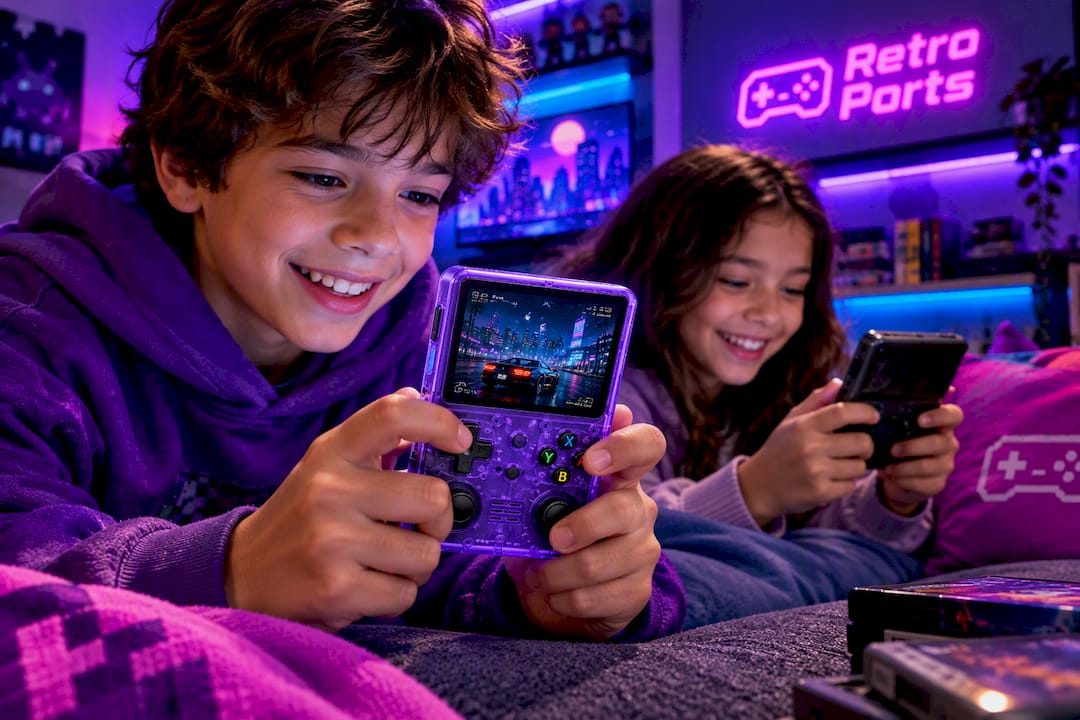
A few reasons parents reach for it specifically for family game nights:
- Offline-first design means no ads or purchase prompts interrupting a session with your kid.
- A display and real controller layout make it easy for a child to pick up even without prior gaming experience.
- A removable battery rated for several hours covers multiple short sessions without a mid-afternoon charge.
- Warranty and return window give you room to decide if it fits your family, backed by shipping from a U.S. warehouse.
If budget is the main concern, a lower-cost plug-and-play option like the Prime Supply portable console covers basic offline play, though it comes with a smaller built-in library and less durable hardware than a unit built specifically for repeated family use. For a device meant to last through years of hand-offs between siblings, we built Retro Pulse to be the sturdier, better-stocked choice from the start.
Ready to start tonight’s ten-minute session? Pick up a Retro Pulse handheld and hand it to your kid.
FAQ
What age is best to start sharing retro games with kids?
Most children can start with simple retro games around age four or five, once they can follow a basic goal and manage a D-pad or single-button control. Younger kids can still participate in co-play with a parent handling the trickier parts, following the coviewing approach the AAP recommends for young children.
How long should a retro gaming session last for a young child?
Five to ten minute rounds work well for most young children, based on co-play research showing short first sessions with a clear cooperative goal produce the best engagement and reduce resistance to future play. Several short rounds also fit comfortably within the AAP’s general guidance of about one hour of high-quality screen time daily for children ages 2 to 5.
Do I need to buy original retro consoles to share these games with my kids?
No, a dedicated handheld preloaded with a curated game library avoids the cost, scarcity, and fragile hardware of original consoles while still delivering the same offline, distraction-free experience. Retro Pulse is one option built specifically for this, shipping with 15,000 games across more than 20 systems ready to play out of the box.
How do I stop my child from getting frustrated with older, harder games?
Choose games with forgiving fail states for younger kids, use two-player cooperative modes where available so you can quietly handle the hardest parts, and keep sessions short enough to end on a good note. Letting your child lead decisions, rather than taking the controller when they struggle, also tends to reduce frustration according to autonomy-supportive co-play research.
Are retro games safer for kids than modern games with online features?
Offline retro games avoid online chat risks and the in-app purchase prompts that modern games sometimes use, which is one reason curated offline libraries appeal to parents managing screen time. For any game with online or purchase features, the ESRB’s parental control tools let you restrict communication and in-game spending at the device level.
Sources
- Parent-child co-play research (Clemson)
- Gather to Glow: autonomy-supportive co-play (ACM IDC 2026)
- Media and Young Minds — AAP policy statement
- Parental Controls – ESRB