For most 2D fighting games and precision-timed inputs, a D-pad gives you cleaner, more repeatable results. For nuanced 3D movement, camera control, and racing or flight genres, an analog stick wins because it reads variable pressure instead of simple on-off signals. Comfort and training still matter: plenty of players land clean inputs on either input, and some fighting game veterans prefer a full arcade stick to both.
TL;DR:
- D-pads provide more consistent and accurate inputs for fighting games and platformers, especially for discrete directional commands like quarter circles.
- Analog sticks excel in 3D games, allowing smooth movement, camera control, and partial throttle input, but are prone to drift and wear over time.
- In long-term use, D-pads tend to wear at the pivot point, while analog sticks suffer from sensor degradation and phantom inputs.
- Matching control type to genre is crucial: fighters and platformers favor D-pads, while open-world and racing games benefit from analog input.
- Using a device like Retro Pulse, which combines both controls, enables direct comparison and personalized choice based on actual gameplay experience.
Table of Contents
- D-Pad vs Analog Stick: A Side-by-Side Breakdown
- How D-Pads and Analog Sticks Actually Work
- Matching Your Controls to the Game You Actually Play
- Tuning, Mapping, and Training for Better Inputs
- Why a Handheld With Both Inputs Solves This Debate
- Where the Evidence Leaves Room for Personal Preference
- Try Both Inputs on One Retro Pulse Handheld
- FAQ
- Sources
D-Pad vs Analog Stick: A Side-by-Side Breakdown
A D-pad is a binary input. Each direction is either pressed or not, which means the game receives a clean, instant signal every time your thumb hits a direction. That predictability is exactly why competitive players lean toward D-pads for clean special move inputs and dashes in 2D fighters.
An analog stick works differently. It reports a continuous range of values rather than a flat on-off signal, which is what lets gamers move with subtlety instead of snapping between fixed states. That range is what makes slow camera pans, careful platforming edges, and partial-throttle driving feel natural.
- Best for: D-pad suits 2D fighters and menu navigation; analog suits 3D movement, camera control, and racing.
- Precision: D-pad wins on repeatable, binary inputs; analog wins on fine-grained, variable inputs.
- Nuance: D-pad has none by design; analog can feather a direction or a throttle.
- Ergonomics: D-pad favors quick thumb taps with less wrist rotation; analog favors circular thumb motion that some players find more fatiguing over long sessions.
- Maintenance: D-pads wear at the pivot point over years of heavy tapping; analog sticks are more prone to drift from worn potentiometers or sensors.
Choose a D-pad if you play fighting games, retro platformers, or anything built around discrete directional taps. Choose an analog stick if you play open-world action, twin-stick shooters, or racing titles where partial input matters more than instant snap.
How D-Pads and Analog Sticks Actually Work
A D-pad is built around a set of switches arranged in a cross, usually paired with a pivot or rocker mechanism underneath a single plastic cap. Pressing a direction, or a diagonal between two directions, closes a switch and sends a flat signal: on or off, with eight possible directions and no values in between. That simplicity is also its strength. The design traces back to Nintendo engineer Gunpei Yokoi, who popularized the cross-shaped pad on the 1982 Game & Watch Donkey Kong before it became standard on the NES.
An analog stick works through a potentiometer or Hall-effect sensor at its base, translating thumb position into a range of values along two axes, often something like 0 to 255 per axis. That range is what allows a slow tilt and a full push to register as different inputs, but it also introduces complications. Small, unintentional nudges near center can register as movement, which is why controllers ship with a dead zone that ignores minor stick drift near the neutral position.
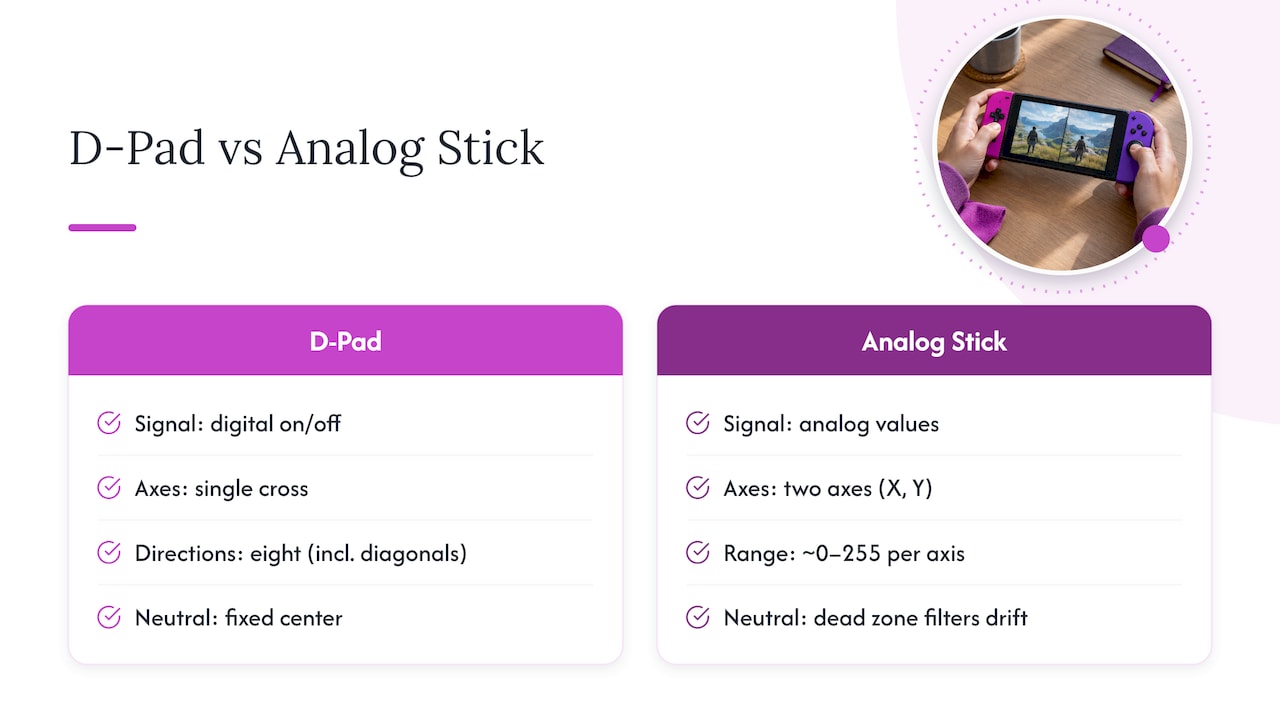
Reliability diverges over time, too. D-pads wear mechanically at the pivot, which can make diagonals feel mushy after years of heavy use. Analog sticks face a different problem: internal sensors degrade and begin reporting phantom input even when the stick sits untouched, a well-known issue generally called drift. Neither failure mode is instant, but both affect long-term accuracy in different ways.
Matching Your Controls to the Game You Actually Play
Genre should drive your input choice more than general preference. Here’s how that plays out across common categories.
- Fighting games: A D-pad (or a dedicated arcade stick) tends to be the preferred choice for clean quarter-circles, dashes, and charge inputs, since binary signals eliminate the accidental diagonal drift that can turn a fireball into a jump. Street Fighter 6 even separates its control schemes into Classic, built around traditional directional inputs, and Dynamic, a casual-friendly mode with automated specials, and high-level play still leans on Classic.
- 2D platformers and action games: Discrete taps for jumping, dashing, and tight directional changes favor the same binary logic that makes D-pads reliable in fighters.
- 3D action, adventure, and twin-stick shooters: Analog sticks let you walk at a jog instead of a sprint, aim smoothly between two points, and rotate a camera without jarring snaps, all of which depend on variable input rather than fixed states.
- Racing and flight games: Analog sticks and analog triggers report partial throttle and brake pressure, which is the difference between a controlled drift and an abrupt stop; mechanical triggers only register on or off, while analog triggers capture that in-between range.
Some fighting game players still prefer a full joystick over a D-pad for circular motions, since wrist rotation on a stick can feel more natural than thumb rolling on a compact pad. Genre rules of thumb are a starting point, not a mandate.
Tuning, Mapping, and Training for Better Inputs
Small adjustments on either input type can close most of the performance gap you’d otherwise blame on hardware.
- Lower the dead zone slightly on PC or console settings if your stick feels sluggish near center, but raise it back up if you notice unintentional drift during idle moments.
- Map your most-used D-pad directions to your dominant thumb’s natural resting position rather than forcing an awkward reach for diagonals.
- Practice with input recording or training mode to catch dropped or mistimed directional presses before they show up in a match.
- Run simple repetitive combo drills daily rather than long irregular sessions. Short, consistent reps build the muscle memory that makes either input feel automatic.
- Switch inputs between matches, not mid-match, so your hand doesn’t have to relearn grip and spacing under pressure.
Pro Tip: Record your inputs during practice mode and review which directions get dropped most often. That tells you whether the problem is your hardware or your technique.
Why a Handheld With Both Inputs Solves This Debate
Retro Ports offers a unique handheld gaming console, Retro Pulse, loaded with 15,000 classic games from over 20 systems including NES, SNES, and PS1, which means you can test D-pad-reliant fighters and analog-dependent 3D titles on the same device instead of guessing from spec sheets. Retro Pulse features a robust design with a vibrant 3.5" IPS display and an offline-first gaming experience, so matches run without downloads, subscriptions, or menu detours eating into practice time.

The console is built for gamers of all ages, making it practical for parents who want to hand a controller to their kids without a setup tutorial. A removable battery extends play sessions, and Retro Pulse ships with a one-year warranty, covering both casual players and anyone logging serious practice hours on fighting game inputs.
Where the Evidence Leaves Room for Personal Preference
In practice, I lean on a D-pad for anything resembling a 2D fighter or precision platformer, because the binary response removes guesswork from diagonal inputs. For open-world exploration or anything with a free camera, I reach for the stick without hesitation, since half-speed movement and smooth aim just aren’t possible on a flat directional pad. Neither preference is universal. Some players’ hands simply fit a stick better, others grew up on D-pads and never unlearned that muscle memory, and both are legitimate reasons to choose one over the other. Hardware variance matters too: a worn stick or a mushy D-pad pivot can sour anyone on an input that would otherwise suit them. Test both on real matches, track your drop rate, and let your own data settle the argument.
— Sean
Try Both Inputs on One Retro Pulse Handheld
Rather than buying separate devices to test D-pad and analog performance, Retro Pulse puts a real D-pad, twin analog sticks, and analog triggers on a single handheld, so you can compare how each feels across the genres covered above without switching hardware.

- Real D-pad plus twin analog sticks and L/R triggers for side-by-side genre testing.
- 15,000 preloaded games across more than 20 systems, including NES, SNES, Genesis, and PS1.
- Offline-first library with no downloads or subscriptions needed before you start playing.
- Removable battery rated for 6 to 8 hours, with USB-C charging for quick top-offs between sessions.
Check out the Retro Pulse handheld if you want to settle the D-pad versus analog debate on your own thumbs instead of taking anyone else’s word for it.
FAQ
Why do they call it a D-pad?
The name comes from its directional function. The cross-shaped design was popularized by Nintendo engineer Gunpei Yokoi on the 1982 Game & Watch Donkey Kong before becoming standard on the NES, where “D” refers to the directional control it provides.
Is Street Fighter 6 better played with a D-pad or analog stick?
Most competitive players favor D-pad or arcade stick over analog for Street Fighter 6, since binary inputs produce cleaner motions for specials and dashes. The game itself offers Classic and Dynamic control types, with Classic built around traditional directional inputs that high-level play still relies on.
Which D-pad is best for fighting games?
There’s no single verified ranking of D-pad hardware, but community consensus consistently points to designs with a distinct pivot point and low travel distance as easier for clean diagonal inputs. Testing a few controllers yourself, or trying a device with a dedicated D-pad like Retro Pulse, remains the most reliable way to judge fit for your hand.
Are analog triggers better than mechanical triggers?
Analog triggers report a continuous range of pressure, which makes them better suited to racing and flight games that need variable throttle or brake control. Mechanical triggers only register on or off, which is simpler and more durable but offers no in-between input.
Sources
- Your Move: D-pad — KMUW
- Analog vs digital controller inputs explained — CheckpointGamer
- Mechanical vs Analog Triggers — DeviceProbe
- FIGHTING GROUND MODE | STREET FIGHTER 6 | CAPCOM